
Every component and Markdown feature Pholio renders, each followed by its source.
This page uses every component tag and every Markdown construct Pholio accepts. Each example shows the rendered result first and the source that produced it underneath. The attributes are listed in Content format.
Callouts
A callout has a type and an optional title; its body is Markdown. Without
a type it is info.
A callout without a type or a title.
Info
Background information that helps but isn't required.
Warning
Something that can go wrong if the reader skips it.
Error
Something destructive that can't be undone.
Success
What the reader sees when everything worked.
Idea
A suggestion worth trying.
Tip
tip is an alias for info.
Warn
warn is an alias for warning.
Custom icon
icon replaces the type's icon with any lucide icon.
Cards
Cards group links. Each card can carry a lucide icon; a card without href is
static.
Getting started
Install Pholio and build a first site.
Configuration
Every key of pholio.config.php.
Static
A card without a link or an icon.
With an icon
A static card with an icon.
Tabs
items lists the labels, separated by |; each Tab names its label in
value. defaultIndex picks the tab that starts open, updateAnchor writes
the choice into the URL hash.
Run the installer in any shell.
Run the installer in Terminal.
Run the installer in any shell.
Use WSL and run the installer there.
Grouped tabs
Tabs with the same groupId switch together; persist remembers the choice
across pages and visits.
The installer links pholio into ~/.local/bin.
The installer links pholio into ~/.local/bin.
Run php bin/pholio from the clone.
Steps
Each Step is numbered; a heading inside it becomes the step's title.
Accordions
With type="single" one item is open at a time; defaultValue opens items
at the start. With type="multiple" any number can be open at once.
PHP 8.2 with mbstring and ctype. Nothing else.
On any static host. An .htaccess for Apache is written alongside.
Built at compile time, ranked in the browser.
Every page also exists as Markdown, listed in llms.txt.
Files
A file tree with nested folders. defaultOpen expands a folder, disabled
keeps it closed, icon sets a file's icon.
Type table
Options of an API, with types, defaults and expandable descriptions.
Prop
Site name, shown in the header and in <title>.
Interface language and default search tokenizer.
Type
Any other language needs translations
Default
"en"
Logo width and height in pixels.
Default
24
An old key, shown struck through.
Images
Screenshot with a dark variant
Screenshot shows dark in the dark color scheme and src in the light one.
Switch the theme to see both.
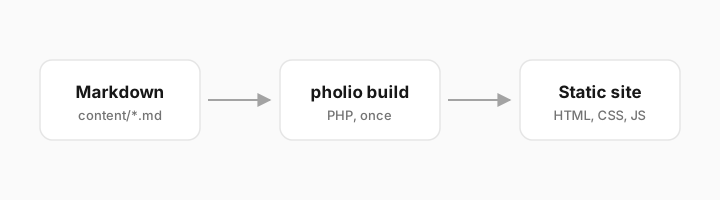
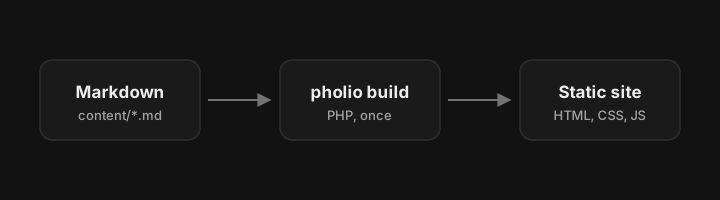
Image zoom
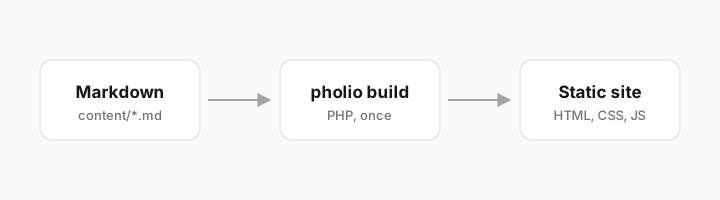
ImageZoom opens the image enlarged on click. This SVG follows the color scheme
by itself, so one file works in light and dark.
Markdown image
A plain Markdown image renders as one bordered image, sized from the file.
Code blocks
Title and line numbers
Line numbers from another start
Highlighted lines and words
Focus
Added and removed lines
Diff language
Code tabs
Consecutive code blocks with a tab attribute are merged into one tab group.
Code as tag content
DynamicCodeBlock takes its code verbatim from the tag's content.
Tables
Columns align left, center or right.
| Command | Writes | Exit code |
|---|---|---|
build | the site | 0 |
check | nothing | 1 on differences |
dev | the site, with drafts | 0 |
Text
Emphasis, code and links
Bold, italic, both, strikethrough, inline code, an
internal link and an
external link.
Hard line breaks
Two trailing spaces end a line
without starting a new paragraph.
The ·· above stands for the two trailing spaces.
Blockquote
Write the page you wish you had found the first time.
Lists
- Ordered lists count themselves.
- They nest:
- an unordered item
- another one
- And continue afterwards.
- Task lists
- with open items
Footnotes
Search runs in a Web Worker1 and needs no backend2.
The footnotes are collected at the end of the page.
Horizontal rule
Headings
Headings ## to #### get anchors and appear in the table of contents. Hover
one to copy its link.
A fourth-level heading
Banner
A Banner is an announcement bar across the top of the page, so it sits
outside this showcase. Its source looks like this: